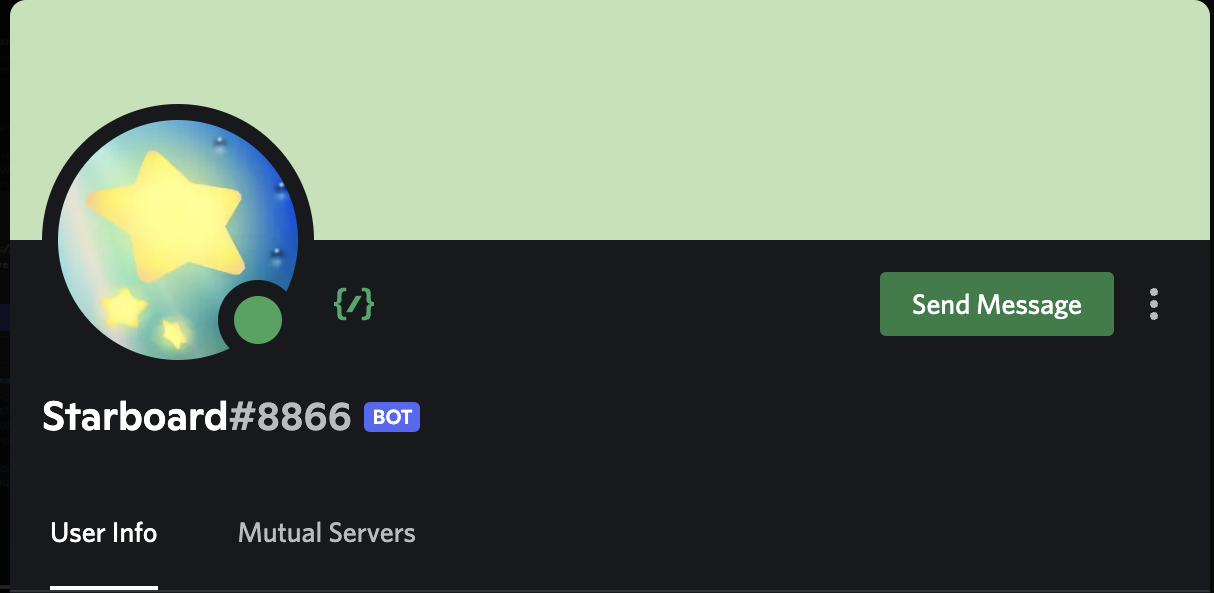
The Verdict: In the modern Discord ecosystem, the Command Badge is the visual standard of competence. It signals to users that your bot utilizes Slash Commands (/) rather than outdated text prefixes (!). If your bot profile lacks this badge, you are signaling “Legacy Tech” to your users.
This isn’t just a cosmetic icon; it is a UX indicator. It tells users, “I am integrated with the native Discord interface.” Here is how to earn the badge, why it boosts adoption, and the technical requirements to trigger it.
The Badge Anatomy
The Command Badge appears on your bot’s profile card (the pop-out when someone clicks the bot’s name).
- The Visual: A slash command icon (
/) next to the bot’s name. - The Tooltip: Hovering reveals “Supports Commands.”
- The Signal: It proves your bot uses the Global Command Map, meaning it is ready for deployment across any server without manual setup.
The “Global” Requirement
To acquire this badge, you cannot simply code a command; you must register a Global Command.
- Guild Commands (Local): These update instantly but are restricted to specific servers. These do not trigger the badge.
- Global Commands (Public): These are available in every server the bot joins. These trigger the badge.
Elite Note: Global commands can take up to 1 hour to propagate across Discord’s API cache. If you register one and don’t see the badge immediately, wait 60 minutes.
ROI Matrix: Why You Need It
| Feature | Legacy Bot (No Badge) | Modern Bot (Badge) |
| Discovery | Users must guess prefixes (!help, ?play) | Auto-complete in chat (/) |
| Trust | Looks like a hobby project | Looks like a verified application |
| Mobile | Difficult to type commands | Native UI selection |
Tactical Guide: How to Unlock the Badge
Time to Execute: < 10 Minutes (plus API propagation time).
- Code a Global Command:Use your library (discord.js / discord.py) to define a basic Slash Command, User Command (Context Menu), or Message Command.JavaScript
// discord.js example const data = new SlashCommandBuilder() .setName('ping') .setDescription('Replies with Pong!'); - Register via REST:Push this command to the applicationCommands endpoint (Global), not the applicationGuildCommands endpoint.
- Verification:Once the API accepts the payload, Discord automatically appends the badge to your bot’s profile. No manual application is required.
FAQ Vortex
Q: I have slash commands, but no badge. Why?
A: You likely registered them as Guild (Server) Commands for testing. You must push them as Global Commands to earn the badge.
Q: Does this cost money?
A: No. It is a free UI update for any bot using the Interactions API.
Q: Do Message Commands (Apps) count?
A: Yes. Any interaction type (Slash, User Context, Message Context) registered globally will trigger the badge.
Zenith CTA
Stop relying on legacy prefixes. Update your codebase to support Global Slash Commands today. Register your first global command and wear the badge of the modern developer.