 By Discord Media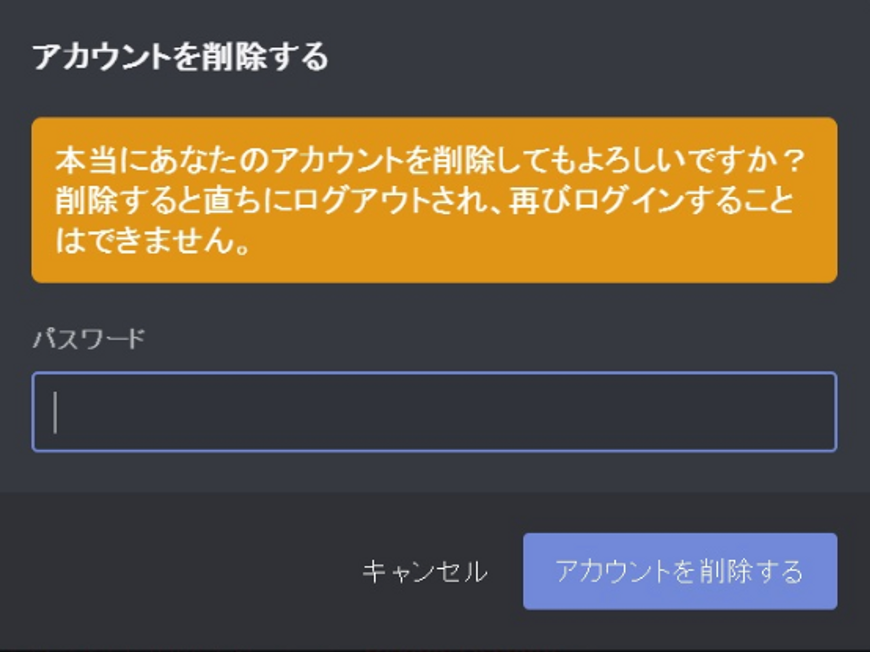
Deleting a Discord account is not as simple as hitting a button. If you are a Server Owner or a Nitro Subscriber, a careless exit will result in “Ownership Transfer” errors or—worse—phantom billing cycles where you continue paying for a service you can no longer access.
This is your tactical guide to scrubbing your digital footprint, securing your finances, and executing a clean break from the platform in 2025.
1. Strategic Decision: Disable vs. Delete
Before initiating the wipe, determine your objective. Discord offers two distinct exit paths.
- Disable (Stasis Mode): Your data remains frozen. You disappear from the grid (offline status), but you can return instantly by logging in.
- Delete (The Nuclear Option): A permanent, irreversible data purge after a 14-30 day grace period.
The Insight Matrix: Execution Codex
| Feature | Disable (Account Stasis) | Delete (Data Nuke) | Impact |
| Data Retention | Preserved (Friends, Servers) | Permanently Destroyed | High |
| Recovery | Instant (Login to restore) | Impossible after ~14 days | Critical |
| Subscription | Continues (Must cancel) | Continues (Must cancel) | Financial |
| Public View | Offline User | “Deleted User #0000” | Reputation |
Editor’s Note: Unless you are scrubbing your identity for security reasons, Disabling is superior. It prevents “regret scenarios” where you lose access to years of chat logs and contacts.
2. Pre-Flight Checklist: The “Trinity” of Prerequisites
Do not skip this. 90% of deletion attempts fail because these three specific toggles are not cleared first.
Step 1: Liquidate Server Assets
You cannot delete an account that owns a server. You are the captain; you must sink the ship or promote a new captain before you leave.
- Option A: Transfer Authority (Legacy Preservation)
- Go to Server Settings > Members (or User Management on mobile).
- Search for the successor.
- Select Transfer Ownership.
- Option B: Scorch Earth (Server Deletion)
- Go to Server Settings > Overview.
- Select Delete Server. Warning: This erases all history for all members.
Step 2: Sever the Financial Tether (Nitro)
Crucial Warning: Deleting your Discord account DOES NOT automatically cancel your Nitro subscription if it is managed via Apple ID or Google Play. You will be billed for a ghost account.
- iOS Users: Settings App > Apple ID > Subscriptions > Discord > Cancel Subscription.
- Android Users: Google Play Store > Profile > Payments & subscriptions > Subscriptions > Discord > Cancel.
- Credit Card (Direct): Discord User Settings > Subscriptions > Cancel.
Step 3: Secure the 2FA Backup
The deletion confirmation screen requires a 2FA code. If you delete the app and lose your phone, you are locked in a catch-22.
- Action: Go to User Settings > Password & Auth.
- Execute: Click View Backup Codes. Save these offline immediately.
3. Execution: The Deletion Protocol
For Mobile (iOS/Android)
- Tap your Profile Picture (bottom right) > Gear Icon (top right).
- Select Account.
- Scroll to the bottom > Tap Delete Account (Red Text).
- Input your Password and 2FA Code to confirm.
For Desktop (PC/Mac)
- Click User Settings (Gear Icon).
- Stay on the My Account tab.
- Scroll down to the “Removal” section.
- Click Delete Account.
- Input credentials to finalize.
4. The Aftermath: Anonymization & Ghost Data
Once executed, your account enters a “Pending Deletion” state for 14-30 days. Logging in during this window triggers a “Restore Account” prompt.
What actually happens to your data?
- Identity: Your username becomes
Deleted User #xxxx. Your avatar resets to default. - The Message Persistence Trap: Your sent messages ARE NOT DELETED. They are simply anonymized. The text remains visible in the server.
- Pro Tip: If you need the text gone, you must manually delete messages or use a script (risky) before deleting the account.
5. FAQ Vortex: Advanced Troubleshooting
Q: I receive a “You must transfer ownership” error.
A: You still own a server. Even a test server with 0 members counts. You must delete or transfer every single server where you hold the Crown icon.
Q: Can I reuse my email immediately for a new account?
A: No. The email is locked during the 14-30 day grace period.
- The Elite Workaround: Before deleting, change your email in Settings to a “burner” address (e.g.,
alias+trash@gmail.com). This instantly frees up your main email for a new account.
Q: I deleted my account but I’m still getting charged.
A: You failed to cancel the subscription on the provider side (Apple/Google). Discord cannot stop Apple from billing you. Go to your phone’s App Store settings immediately.
Q: Why does “Deleted User” still show my old messages?
A: Discord’s architecture anonymizes the User ID, not the Content. To remove content, you must scrub the messages individually before nuking the account.
Final Verdict:
Account deletion is irreversible. If you are hesitant, choose Disable. If you proceed, ensure your Nitro sub is dead at the source, or you will be paying for a ghost.