 By Discord Media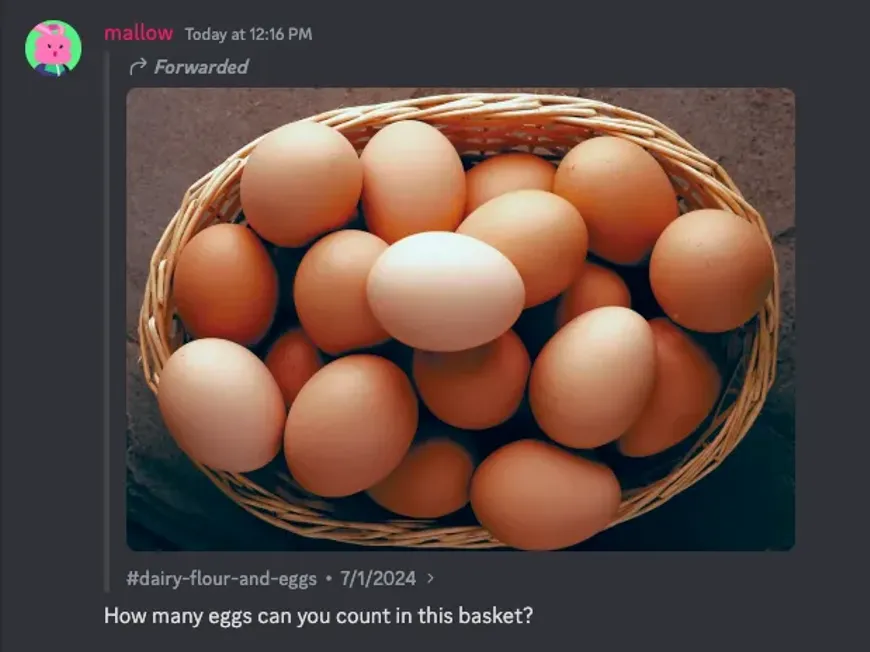
Stop saving images to your camera roll just to re-upload them five seconds later. The “save image > switch server > upload” loop is archaic friction. Discord’s Message Forwarding feature allows you to act as a high-speed relay node, moving memes, intel, and files across the ecosystem with a single click.
This is your tactical guide to the Forwarding architecture—how to execute it, how the “Snapshot” privacy model works, and how to avoid leaking sensitive data from private servers.
1. The Mechanic: Why Forwarding Superiority Exists
Forwarding is not just a copy-paste; it is a structured data relay.
- Zero Friction: No need to download files or consume local storage.
- Attribution: The system automatically tags the message as “Forwarded,” preserving the context (unlike a screenshot which can be faked).
- The Difference:
- Screenshots: Static, easy to fake, clutters storage.
- Link Copying: Useless if the recipient isn’t in the source server (Access Denied).
- Forwarding: The Payload is cloned. The recipient sees the content even without server access, but cannot enter the source server.
2. Execution: The Relay Protocols
Desktop (Command Center)
- Hover over the target message.
- Click the Forward Icon (Curved Arrow) in the top-right mini-menu.
- Shortcut: Right-click message > Forward Message.
- Select the destination (DM or Server Channel) from the pop-up modal.
- (Optional) Add your own commentary and hit Send.
Mobile (Field Ops)
- Long Press the message (text or image).
- Tap Forward Message in the dropdown.
- Select the destination from the “Recent” or “Servers” list.
- Tap Send.
3. OpSec & Privacy: The “Snapshot” Logic
Understanding how Discord handles data privacy during a forward is critical for Admins and Leakers alike.
The “Snapshot” Rule
Forwarding creates a static copy of the message at that exact moment.
- Edits: If the original author edits the message after you forward it, the forwarded copy DOES NOT update.
- Deletions: If the original is deleted, your forwarded copy remains visible (unless the underlying attachment is scrubbed from Discord’s CDN).
The Private Server Paradox (CRITICAL)
- The Content: If you forward a message from a private, locked server to a public one, everyone can see the text/image. You are effectively leaking the data.
- The Source Link: Discord attaches a “Go to original message” link. However, if the recipient is not in the private server, clicking this link results in an “Access Denied” error.
- Verdict: You can share the content, but you cannot give them access to the room.
4. Friction Points: Why It Won’t Send
If the Forward button is missing or fails, you have hit a hard filter.
- NSFW Constraints: You cannot forward content from an Age-Restricted channel to a General (Safe) channel.
- Permission Locks: You cannot forward into a channel where you do not have “Send Messages” or “Embed Links” permissions.
- Bot Embeds: Rich embeds created by older Bots often lack the API hook for forwarding.
- Paywalls: Server Subscription (Premium) content is often DRM-locked against forwarding.
5. Insight Matrix: Communication Tactics
| Objective | Recommended Action | Why? |
| Share a Meme/Image | Forward | Saves storage, instant rendering. |
| Reference a Debate | Copy Message Link | Prevents flooding the chat with long text. |
| Contextual Reply | Reply | Keeps the conversation threaded in one place. |
| “Receipts” (Evidence) | Forward | harder to fake than a screenshot; shows source ID. |
6. FAQ Vortex
Q: Does the original author know I forwarded their message?
A: No. There is no notification sent to the original poster stating “User X forwarded your message.” However, the forwarded message is public in the destination channel.
Q: Can I forward a message to multiple people at once?
A: Currently, the UI is optimized for single-destination selection per action. You have to repeat the process for mass distribution.
Q: If I forward a scam link by accident, does Discord ban me?
A: Yes. You are responsible for the content you distribute. Forwarding a TOS-violating message (phishing, malware) treats you as the distributor.
Become the Relay Node.
Stop screenshotting text. It looks amateur. Use Forwarding to keep your cross-server comms clean, fast, and verified.