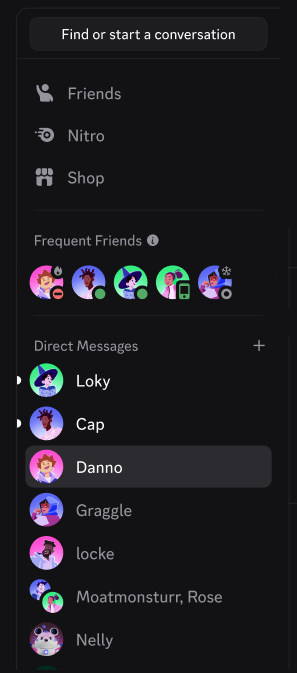
“Why does the top of my DM list look different?”
“Who are these people listed under ‘Familiar Friends’?”
If you recently opened Discord on your PC and noticed a new section at the top of your Direct Messages called “Familiar Friends,” you are not alone. This is a new feature that has left many users confused about how it works and whether it affects their privacy.
The short answer: “Familiar Friends” is a shortcut list that automatically displays the users you interact with most frequently via text or voice. It is currently an experimental feature available only on desktop.
Here is a complete guide to how people get on this list, why non-friends might appear there, and if anyone else can see who is on your list.
💡 What Is “Familiar Friends”?
Familiar Friends is a new section located at the very top of your Direct Messages (DM) list on the Discord Desktop and Web apps.
It acts as a “Quick Access” bar. Instead of scrolling through your history to find the person you were just talking to, Discord pins your most active connections to the top for easy access.
Note: This is currently an experimental feature. It is being rolled out to a limited number of users for testing, so your friends might not see it yet.
🔍 How Are They Chosen? (The Criteria)
Why does a specific person appear in this list? According to Discord’s official testing parameters, the algorithm selects users based on two main factors:
- Message Frequency: The users you exchange the most DMs with.
- Voice Activity: The users you spend the most time with in Voice Channels (VC).
Essentially, Discord analyzes your recent activity and automatically highlights the people you communicate with the most.
🛡️ Privacy: Can They See My List?
This is the #1 question users have: “Does the other person know they are on my ‘Familiar Friends’ list?”
No. The list is 100% private to you.
- It is not mutual: Just because someone is on your list does not mean you are on theirs.
- No notifications: Users are not notified when they appear in your Familiar Friends section.
- No public display: No one else can see who is on your list.
You can rest easy—your browsing and chatting habits are not being broadcast to your friends.
❓ Why Are “Non-Friends” on the List?
“I haven’t added this person as a friend. Why are they here?”
The feature is named “Familiar Friends,” but it applies to anyone you interact with, regardless of your official friendship status on Discord.
If you are in a shared server and frequently DM a specific user, or if you sit in a Voice Channel with someone for hours every day, Discord considers them “Familiar.” They will appear in this list to help you message them faster, even if you haven’t clicked the “Add Friend” button.
⚙️ Can I Turn It Off or Hide People?
Currently, No.
Because this feature is still in the experimental phase, user controls are very limited.
- You cannot turn the feature off.
- You cannot manually hide specific people from the list.
- You cannot pin/unpin people manually.
The list is entirely automated. If you stop interacting with a specific user, they will eventually drop off the list as your activity with them decreases.
📱 Is This on Mobile?
No. As of late 2025, the Familiar Friends feature is only available on:
- Discord Desktop App (Windows/Mac/Linux)
- Discord Web Browser Version
It has not yet been implemented on the iOS or Android mobile apps.
🌟 Summary
The “Familiar Friends” feature is Discord’s attempt to make navigating your DMs faster.
- It creates a shortcut for your most frequent contacts.
- It is based on DMs and Voice Chat time.
- It includes non-friends if you talk to them often.
- It is completely private (no one else sees your list).
While you can’t edit it yet, it’s a harmless tool designed to save you a few clicks. If you see it, you are part of the exclusive testing group!