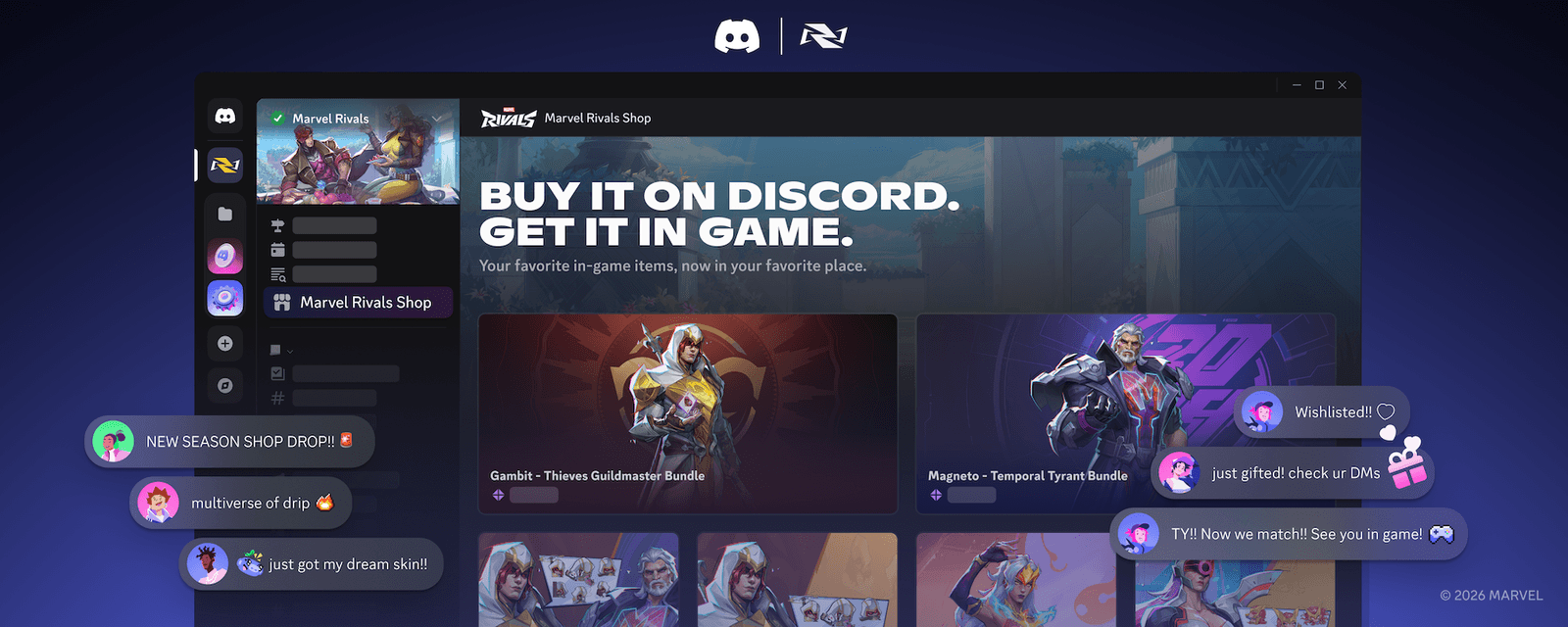
Discord has officially launched in-game commerce capabilities, allowing players to browse, buy, and gift in-game items directly from Discord servers.
Gone are the days of needing to launch a game client just to buy a limited-time skin or send a gift to a friend. With this new update, Discord is transforming from a communication hub into a social marketplace, integrating deeply with the games you play.
This guide breaks down how this new commerce system works, the launch features with Marvel Rivals, and how you can start gifting items today.
🛍️ What is Discord In-Game Commerce?
Discord has been slowly building its commerce infrastructure—first with the “Discord Shop” for avatar decorations, and now expanding into actual in-game digital goods.
This feature allows game developers to set up a storefront directly inside their official Discord server. For players, this means you can see a new “Shop” tab in the server list, browse items like costumes and skins, and purchase them using your saved Discord payment methods.
Key Benefits:
- Convenience: Buy items without opening the game.
- Social Gifting: Send items to friends via DM, even if you don’t play the game yourself.
- Wishlists: See exactly what your friends want on their Discord profiles.
🚀 Launching with Marvel Rivals
Discord is debuting this feature with Marvel Rivals, the hit superhero shooter. With over 10 million players in its first 72 hours and a Discord community of over 4 million members, it is the perfect testing ground for this social commerce experiment.
What can you buy in the Marvel Rivals Discord Shop?
- Costumes & Skins
- Emotes & Emojis
- MVP Animations
- Nameplates & Sprays
- Exclusive Bundles
Note: This launch is timed for the game’s first anniversary and holiday season, making it a prime opportunity for gifting.
🎁 How to Use the New Commerce Features
Here is a step-by-step guide on how to navigate this new system.
1. Browsing the Server Shop
If you are in the official Marvel Rivals Discord server, look for a new “Shop” tab in the channel list (usually near the top). Clicking this opens a visual storefront where you can inspect 3D models or previews of items just like you would in-game.
2. Using Wishlists
You can now curate a list of items you want.
- Add to Wishlist: When viewing an item, click “Add to Wishlist.”
- View Friends’ Lists: Click on a friend’s profile. If they have created a Wishlist, it will appear there, taking the guesswork out of holiday gifting.
3. Gifting via DMs
This is the most powerful feature of the update. You do not need to have the game installed to send a gift.
- See a friend’s Wishlist or pick an item from the Server Shop.
- Click “Gift”.
- Select your friend from the list.
- They receive a beautiful gift notification in their DMs.
4. Instant Redemption (Account Linking)
To claim items, you must link your game account to Discord.
- Once linked, any item you buy or receive on Discord instantly appears in your game inventory.
- This uses the Discord Social SDK, ensuring a secure and fast connection between the app and the game servers.
❓ FAQ: Common Questions
Q: Is this available for every game?
A: Currently, it is launching exclusively with Marvel Rivals. Discord plans to expand this to other partners and regions in the future as they refine the experience.
Q: Do I need to play the game to buy a gift?
A: No. You can buy a Marvel Rivals skin for a friend even if you have never played the game. This is perfect for parents or friends who want to give a gift without understanding the game itself.
Q: Is it safe to buy through Discord?
A: Yes. Discord uses its established secure payment processing system (the same one used for Nitro and Server Boosts). Your payment info is not shared directly with the game developer.
Q: What regions is this available in?
A: The initial phase supports USD purchases on the Desktop Client for players in the US, Canada, UK, Ireland, and Oceania.
🌟 Conclusion
Discord is blurring the line between “social app” and “game platform.” By bringing the store to where the players hang out, they are making it easier than ever to support developers and celebrate with friends.
To recap:
- Browse items in the official game server.
- Check friends’ profiles for Wishlists.
- Gift items instantly via DM.
Next Step for You: Join the Marvel Rivals official Discord server right now and look for the Shop tab to create your first Wishlist!