Introduction
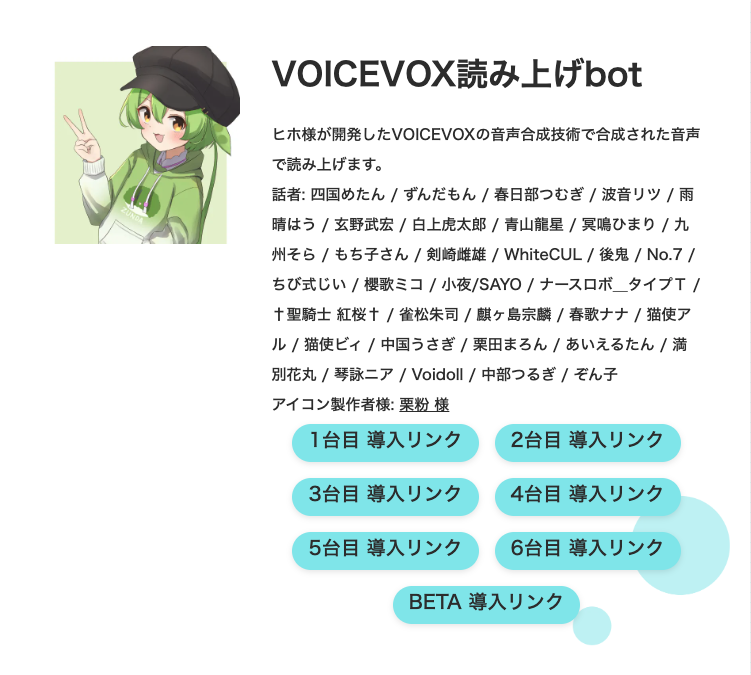
A VOICEVOX bot is a text-to-speech (TTS) tool for Discord that reads text from your chat channels aloud using the high-quality, expressive voices from the free VOICEVOX engine. It’s most famous for its popular characters like Zundamon and is perfect for gaming, streaming, or helping “listen-only” (kiki-sen) members participate.
What is VOICEVOX? (And Who is Zundamon?)
For those unfamiliar, VOICEVOX is an open-source, deep-learning-based voice synthesizer from Japan. It’s famous for its incredibly natural and emotionally expressive cast of “characters.”
- Zundamon: A mascot character (a green, bean-mochi fairy) whose “normal” voice style is one of the most popular and recognizable text-to-speech voices in Japan, known for its unique, cute tone.
- Why it’s popular: Unlike robotic TTS, VOICEVOX voices have built-in emotional styles (happy, sad, etc.) and natural intonation, making chat far more engaging.
Core Features of a VOICEVOX Bot
Here’s what makes these bots a powerful addition to your server.
- Diverse Character Voices: Access a huge library of voices beyond Zundamon, including Shikkoku Metan and others.
- Voice Parameter Settings: You can change the voice to suit your needs using commands.
- Speed: Make the voice talk faster or slower.
- Pitch: Change the highness or lowness of the voice.
- Intonation: Adjust the “emotional” delivery.
- Custom Dictionary: Teach the bot how to pronounce specific names, gamer tags, or slang. This is often done with a
/dict add [word] [pronunciation]command. - External Tool Integration: Some advanced bots can link with desktop tools like “Bouyomi-chan” for even more complex streaming and recording setups.
How to Set Up a VOICEVOX Bot
Getting a VOICEVOX bot running in your server takes just a few minutes.
- Find a Bot: Search a bot list (like top.gg) for a “VOICEVOX” or “読み上げ” (yomiage, meaning “read aloud”) bot.
- Invite the Bot: Use the bot’s invite link to add it to your server. You must have “Manage Server” permissions.
- Grant Permissions: Authorize the bot to have the required permissions (e.g., “Connect,” “Speak,” “Read Messages”).
- Join a Voice Channel: You must be in a voice channel first.
- Connect the Bot: Use the bot’s “join” command (like
/joinor/connect) in a text channel. The bot will join your current voice channel. - Start Talking: Type a message in the text channel the bot is monitoring. It will read it aloud!
Common Commands (How to Use the Bot)
Commands vary by bot, but here are the most common ones you’ll need.
| Command | Description | Example |
/join (or /connect) | Makes the bot join your current voice channel. | /join |
/leave (or /disconnect) | Makes the bot leave the voice channel. | /leave |
/setvoice | Changes the character voice. | /setvoice Zundamon |
/setspeed [value] | Changes the reading speed (e.g., 1.0 is normal). | /setspeed 1.2 |
/setpitch [value] | Changes the voice’s pitch. | /setpitch 1.1 |
/dict add [word] [reading] | Adds a word to the custom dictionary. | /dict add "Gemini" "Jemi-nai" |
/help | Shows a full list of all available commands. | /help |
Pro-Tip for Community Managers:
“The custom dictionary is your most powerful tool. Use it immediately to add server-specific game terms, streamer names, and inside jokes. This single step makes new members feel included and stops the bot from ‘butchering’ your community’s unique language.”
Pricing: Free vs. Paid Plans
- Free Plans: Most VOICEVOX bots offer their basic functions for free. This is usually enough for small servers and includes core voices and text-to-speech.
- Premium/Paid Plans: Some bots offer paid plans (e.g., “KuronekoServer” bot plans). These often provide:
- Access to all character voices.
- Higher character limits for messages.
- Better audio quality (higher bitrate).
- Fewer restrictions and priority access during high-traffic times.
Frequently Asked Questions (FAQ)
Q: Is a VOICEVOX bot difficult to install?
A: No. It’s as easy as any other Discord bot. Just use the invite link, select your server, and authorize it. The main setup is just using the /join command.
Q: How much can I use for free?
A: Most bots let you use the basic TTS and a few popular characters (like Zundamon) for free. Paid plans usually unlock more characters, remove message length limits, and give you higher-quality audio.
Q: How do I adjust the bot’s volume? Is there a delay?
A: You can adjust the bot’s volume by right-clicking its name in the voice channel and using the “User Volume” slider. Delays can happen due to network or server load but are generally minimal.
Q: Can I use this on my smartphone?
A: Yes! As long as you are using the official Discord mobile app, you can join the voice channel and hear the bot, and you can type commands in the text channel just like on a desktop.
Q: Can the bot sing (vocal synthesis)?
A: While the full VOICEVOX software has some singing capabilities, this is generally not a real-time feature in Discord bots. They are designed for text-to-speech, not song-to-speech.
Conclusion
VOICEVOX bots are a fantastic way to make your Discord server more lively, accessible, and fun. Whether you’re a gamer, a streamer, or just want to hear Zundamon read your chat, these bots are easy to set up and offer a high-quality experience that standard TTS can’t match.