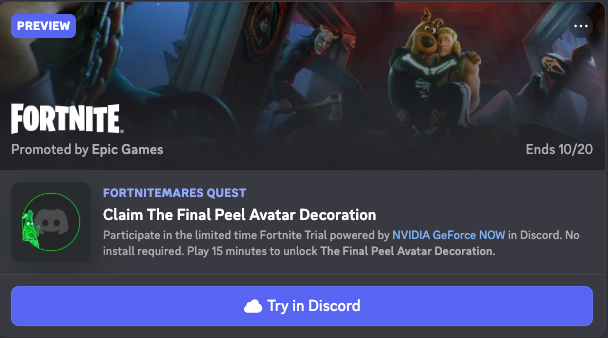
“A new Quest has appeared!” But wait—this one says “Cloud Play.”
If you’ve seen this notification and wondered, “Do I really not have to download anything?” or “Is this safe?” you are in the right place.
The short answer: Discord Cloud Play Quests are a new way to try out games instantly. You don’t need to download 50GB of data or have a high-end gaming PC. You just stream the game directly through the Discord app and earn rewards.
Here is everything you need to know about how they work, how to start, and what to do if you get stuck.
🎮 What Is a Cloud Play Quest?
Cloud Play Quests are a feature that lets you complete Discord Quests by streaming the game instead of installing it.
Think of it like Netflix or YouTube, but for video games. The game actually runs on a powerful server elsewhere, and the video is streamed to your Discord app. You control the game in real-time, but your computer doesn’t have to do the heavy lifting.
Cloud Play vs. Standard Quests
How is this different from the Quests you’re used to?
| Feature | Cloud Play Quest (New) | Standard Quest |
| Installation | None 🚫 (Instant start) | Required 📥 (Large downloads) |
| PC Specs | Low specs work fine | Meets game requirements |
| Internet | Fast, stable connection needed | Standard connection |
| Platform | Discord Desktop App | External Game Launcher |
Start Here: If you have a slow PC but fast internet, Cloud Play is perfect for you.
🚀 How to Start a Cloud Play Quest (Step-by-Step)
Ready to grab that new Avatar Decoration? Follow these steps to get started in seconds.
1. Find Your Quest
Look for the “Cloud Play” label in these spots:
- Quest Home: Go to the Discover tab and select Quests.
- User Settings: Check your Gift Inventory or the Quest bar.
- Friend Activity: If a friend is playing, you might see a “Try Game” button on their profile.
2. Accept and “Jump In”
Click “Accept Quest” and then hit “Play Now” (or “Jump In”). This will launch the activity directly inside Discord.
3. Authenticate Your Account (Important!)
This is the step that confuses most people. Before the game starts, Discord needs to verify you own the game or have an account with the publisher (like Epic Games).
- A browser window will pop up asking you to log in to the game publisher’s account.
- If you don’t have an account, you will need to create one.
- Once linked, the browser will close, and the game will load inside Discord.
4. Play and Earn
Play for the required amount of time (usually 15 minutes). Once the timer hits the goal, you can claim your reward in the Quest Home!
📱 Can I Play on Mobile?
No, you cannot play Cloud Play Quests on your phone.
While you can view and accept the quest on the Discord mobile app (iOS/Android), the actual streaming technology currently requires the Discord Desktop App (Windows/Mac).
- Smartphone: View progress, accept quest, claim reward.
- PC/Mac: Play the game.
🔧 Troubleshooting & FAQ
Having trouble? Here are the fixes for the most common issues.
Q: The game is lagging or looks blurry. Why?
A: Check your internet connection.
Since the game is being streamed, your experience depends 100% on your connection speed.
- Fix: Use a wired ethernet connection instead of Wi-Fi if possible.
- Fix: Close other bandwidth-heavy apps (like 4K video streams or large downloads).
Q: I clicked “Play” but nothing is happening.
A: Restart Discord.
Cloud Play is still an experimental feature. If it freezes:
- Fully close Discord (Quit the app from the system tray).
- Restart the app and try again.
- Pro Tip: Press
Ctrl + R(Windows) orCmd + R(Mac) to refresh Discord instantly.
Q: Why do I have to sign in to another account?
A: To save your progress and verify the user.
Discord isn’t the one making the game; they are just hosting the stream. You need to sign in to the game publisher’s system (like Epic Games) so they know it’s a real human playing. This is standard safety procedure.
Q: I got disconnected! Did I lose my Quest progress?
A: Your progress is safe.
If your internet cuts out, the game session might end, but the minutes you already played count toward your Quest goal. Just reconnect and finish the remaining time.
🌟 Final Verdict: Should You Try It?
Absolutely. Cloud Play Quests are the easiest way to snag free Discord rewards without clogging up your hard drive with games you might only play once.
Your Next Step: Open your Discord Desktop App right now, head to Discover > Quests, and see if a Cloud Play Quest is waiting for you. Good luck!