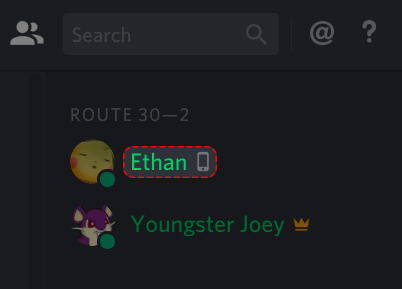
“Why does my friend have a cell phone icon next to their name?”
“Does everyone know I’m using Discord on the toilet?”
If you have noticed a small green smartphone icon next to a user’s avatar instead of the usual green dot, you are looking at Mobile Presence. It is a helpful feature, but it can also feel like a privacy leak if you don’t know how it works.
The short answer: The phone icon means the user is currently online using the Discord mobile app (iOS/Android) and is NOT active on a computer.
Here is everything you need to know about how to trigger it, how to hide it, and why it’s actually useful.
📱 What Is Mobile Presence?
Mobile Presence is an automatic status indicator.
- Green Dot (Online): Usually means the user is logged in on a Desktop/Laptop (or web browser).
- Green Phone Icon: Means the user is active only on their Smartphone.
Why does this exist?
It sets expectations. If you see the phone icon, you know that person is likely “on the go.” They might type slower, they can’t see your 1080p screen share clearly, and they might lose signal.
⚙️ How to “Turn On” Mobile Presence
You don’t need to touch any settings. It happens automatically based on your device activity.
The Rules:
- Mobile Only: You must have the Discord app open on your phone.
- Desktop Inactive: You must be Offline or fully Idle on your desktop computer.
Note: If you have Discord open on your PC and your Phone at the same time, the PC status takes priority. You will appear as a standard “Green Dot,” and the phone icon will be hidden.
🕵️ How to Hide Mobile Presence (Turn It Off)
“I don’t want people knowing I’m on my phone!”
Many users want to disable this specific icon. Unfortunately, Discord does not have a “Disable Mobile Icon” toggle in the settings.
However, you can hide it using these two workarounds:
Method 1: Go Invisible (The Privacy Fix)
This is the only way to use the mobile app without showing the icon.
- Tap your Profile Picture (bottom right of the app).
- Tap Set Status.
- Select Invisible (Grey hollow dot).
- Result: You appear completely offline to everyone, so no phone icon will show.
Method 2: Leave Your PC On (The Override)
If you leave your home computer running Discord (and set it to “Online” instead of “Idle”), your status will show the desktop “Green Dot” even while you are using your phone on the couch.
❓ Frequently Asked Questions (FAQ)
Q: Can I manually set the phone icon while on my PC?
A: No.
You cannot “fake” being on mobile. The icon is determined strictly by which device is currently sending data to Discord’s servers.
Q: Can I see my own phone icon?
A: Generally, no.
On your own screen, you usually just see your status color. To verify if the phone icon is showing, you have to ask a friend or check your profile from a second account.
Q: Does it work on Tablets (iPad/Android Tablets)?
A: Yes.
Tablets run the mobile version of the app, so they will trigger the Mobile Presence icon just like a smartphone.
🌟 Summary
The Mobile Presence icon is a simple indicator that tells friends, “I’m here, but I’m texting with my thumbs.”
- Appears: Automatically when you are on mobile only.
- Disappears: When you log in on PC.
- Hide it: By setting your status to Invisible.
Next Step: Check your status! If you want to browse Discord on your phone without anyone knowing, open the app right now, tap your profile, and switch to Invisible.