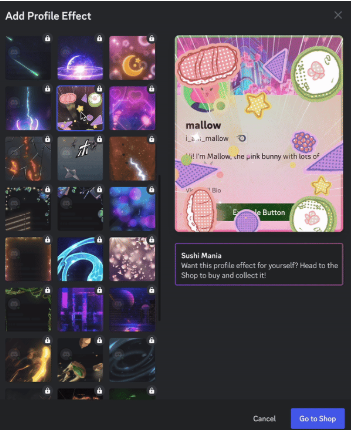
“How did you get that lightning storm behind your profile?”
“I want my profile to look cool like that!”
If you have seen friends with flashy animations that take over their profile card when you click on them, you are looking at Profile Effects. Unlike Avatar Decorations (which just frame your picture), Profile Effects animate your entire profile card, making a huge visual statement.
The short answer: Profile Effects are premium animated backgrounds you can buy in the Discord Shop. Once purchased, they are yours to keep forever, even if you cancel Nitro.
Here is your complete guide to finding the Shop, equipping your effects, and troubleshooting common issues.
✨ What Are Profile Effects?
Profile Effects are high-quality animations that play briefly whenever someone views your profile (either the mini-profile in chat or the full profile).
Examples include:
- Nature: Falling autumn leaves or cherry blossoms.
- Fantasy: Magic runes, sword slashes, or dragon fire.
- Vibes: Cyberpunk glitches, galaxy swirls, or comic book action lines.
They are the ultimate way to show off your personality or match a specific aesthetic.
🛒 How to Buy Profile Effects
You can browse and buy these effects in the Shop. While you don’t need Nitro to buy them, having a subscription saves you money.
Accessing the Shop
- Desktop: Go to User Settings > Profiles. Click the “Change Effect” button, then click the Shop icon (looks like a small storefront).
- Mobile: Go to your Profile tab (bottom right), tap Edit Profile, and select the Shop icon.
Pricing
- Standard Price: Available to everyone.
- Nitro Price: Nitro members get a significant discount on all Shop items.
- Free Items: Occasionally, Discord releases free, limited-time effects exclusively for Nitro members to claim.
⚙️ How to Equip Your Effect
Once you own an effect, applying it is easy.
🖥️ On Desktop (PC/Mac)
- Open User Settings (Gear Icon).
- Select the Profiles tab.
- Click the “Change Effect” button.
- Select your purchased effect from the list.
- Click Apply.
- Save Changes at the bottom of the screen.
📱 On Mobile (iOS/Android)
- Tap your Profile Picture (bottom right).
- Tap Edit Profile.
- Tap Profile Effect.
- Choose the effect you want and tap Apply.
- Tap Save in the top right corner.
❓ Frequently Asked Questions (FAQ)
Q: Do I lose my effects if I cancel Nitro?
A: No.
If you bought the effect (even with the Nitro discount), it is yours to keep forever. You can still equip it even if your subscription expires.
(Note: If the item was a “Free Nitro Exclusive” that you didn’t pay for, you may lose access to it if your subscription ends.)
Q: I bought an effect, but I can’t see it moving!
A: Check your Accessibility settings.
Discord has a setting called “Reduced Motion.” If this is on, effects won’t play.
- Go to User Settings > Accessibility.
- Ensure “Enable Reduced Motion” is turned OFF.
- Also, check “Automatically Play Profile Effects” is turned ON.
Q: Can I use different effects for different servers?
A: Yes (with Nitro).
If you have Discord Nitro, you can use the Server Profiles feature. This lets you equip a spooky effect in a Horror Game server and a cute effect in a social server.
Q: Can I refund an effect?
A: Generally, no.
Shop purchases are final. Always use the “Preview” button on your profile before buying to make sure it matches your avatar and banner perfectly.
🌟 Summary: Make Your Profile Pop
Profile Effects are the boldest way to customize your Discord presence.
- Visit the Shop via your Profile settings.
- Buy the effect (Nitro members get a discount).
- Equip it to instantly upgrade your look.
Next Step: Head to the Shop tab right now—new seasonal items rotate in frequently, so see if there is a look that fits your style today!