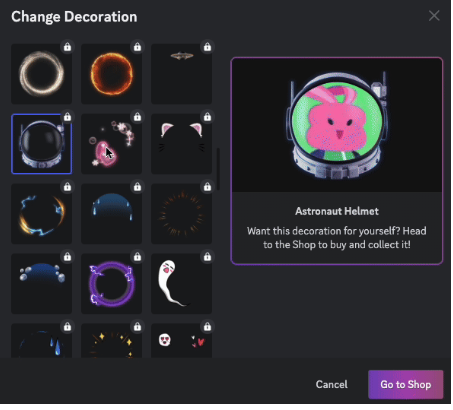
“How do I get those cat ears on my profile picture?”
“Where is the shop to buy the animated frames?”
If you want to make your Discord profile stand out, Avatar Decorations are the answer. These are unique, animated frames that sit on top of your profile picture—like wearing digital accessories.
The short answer: Avatar Decorations are cosmetic items (hats, magic auras, cyberpunk frames) that you can buy in the Discord Shop. Once bought, they are yours to keep forever, and Nitro members get a special discount.
Here is your complete guide to finding the Shop, buying decorations, and equipping them to express your style.
🎨 What Are Avatar Decorations?
Avatar Decorations are animated overlays that style your profile picture. Unlike a standard avatar (which is just a square image), decorations add depth and motion.
Common styles include:
- Fantasy: Magic runes, glowing swords, or dragon fire.
- Anime: Action lines, cherry blossoms, or “power-up” auras.
- Cyberpunk: Neon glitches and HUD elements.
- Seasonal: Halloween ghosts, winter snow, or festive lights.
They appear everywhere your avatar does: in chat messages, the member list, and your main profile card.
🛒 How to Get Decorations (The Shop)
You don’t need to be a Nitro subscriber to buy them, but Nitro members get perks.
Accessing the Shop
- On Desktop: Go to User Settings > Profiles. Click the “Change Decoration” button, then click the Shop icon (a small building).
- On Mobile: Go to your Profile tab (bottom right) and tap the Shop icon in the top right corner.
Pricing & Nitro Discounts
- Standard Users: You can buy any decoration at full price.
- Nitro Subscribers: You get a discount on all Shop items. Plus, Discord occasionally releases exclusive free decorations just for Nitro members to claim.
⚙️ How to Equip Your Decoration
Once you have purchased a style, here is how to wear it.
🖥️ On Desktop (PC/Mac)
- Open User Settings (Gear Icon).
- Select the Profiles tab.
- Click the “Change Decoration” button.
- Select your purchased item from the list.
- Click Apply.
- Save Changes at the bottom.
📱 On Mobile (iOS/Android)
- Tap your Profile Picture (bottom right).
- Tap Edit Profile.
- Tap Avatar Decoration.
- Select the one you want and tap Apply.
- Tap Save in the top right corner.
❓ Frequently Asked Questions (FAQ)
Q: If I cancel Nitro, do I lose my decorations?
A: No.
If you bought the decoration (even with the Nitro discount), it is yours to keep forever. However, if you were using a free seasonal decoration that was only available to active Nitro members, you might lose access to that specific free item if your subscription ends.
Q: Can I use different decorations for different servers?
A: Yes (with Nitro).
If you have Discord Nitro, you can use the Server Profiles feature to equip a spooky decoration in your Horror Game server and a professional one in your Work server.
Q: Can I refund a decoration?
A: Generally, no.
Shop purchases are usually final. However, you can always preview how a decoration looks on your specific avatar before you buy it to make sure it fits perfectly.
🌟 Summary: Dress Up Your Digital Self
Avatar Decorations are the most fun way to show off your personality on Discord.
- Visit the Shop in your Profile settings.
- Preview items to see how they fit your avatar.
- Buy and Equip to stand out in chat.
Next Step: Open the Shop tab right now—there are often free seasonal items or limited-time styles waiting for you to check out!