“I deleted my Discord account by mistake!”
“Can I get my account back, or is it gone forever?”
If you just pressed the delete button and are instantly regretting it, don’t panic. You can still save your account.
The short answer: Discord does not delete your account immediately. It enters a “Pending Deletion” state for 14 days. As long as you are within this two-week window, you can restore your account by simply logging in.
Here is exactly how to stop the deletion process and what happens if you wait too long.
⏳ The 14-Day Safety Window
When you choose to delete your account, Discord puts it in a temporary “limbo” state.
- Days 0–14: Your account is “Pending Deletion.” It is deactivated, but all your data (friends, servers, messages) is still there, waiting for you.
- Day 15+: Your account is permanently deleted. Your data is wiped or anonymized, and it cannot be recovered by anyone, including Discord Support.
🛠️ How to Restore Your Account (Step-by-Step)
To cancel the deletion, you must log in using the Desktop App or a Web Browser.
⚠️ Important: You usually cannot restore an account using the Mobile App. You must use a computer or a mobile web browser.
Step 1: Go to the Login Screen
Open the Discord app on your PC or go to discord.com/login on your browser.
Step 2: Enter Your Credentials
Log in with the email address and password of the account you deleted.
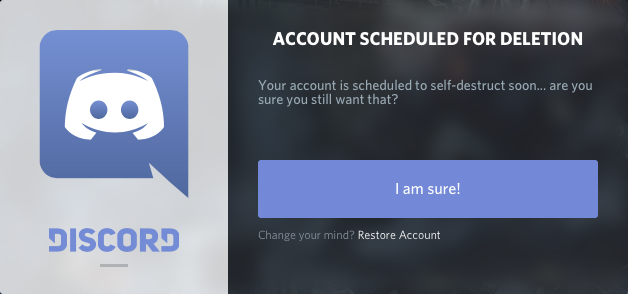
Step 3: Click “Restore Account”
Because your account is in the “Pending Deletion” phase, a special dialogue box will pop up saying “Account Scheduled For Deletion.”
You will see two buttons:
- Restore Account
- Return to Login
Click Restore Account. You will be instantly logged back in, and your account will return to normal as if nothing happened.
❓ Frequently Asked Questions (FAQ)
Q: Can I restore my account using the Mobile App?
A: Generally, no.
The mobile app often treats a pending deletion account as a login error or doesn’t show the “Restore” button correctly. Please use a PC/Mac or a Web Browser (Chrome/Safari) to log in and restore it.
Q: What happens if I miss the 14-day deadline?
A: It is gone forever.
Once the 14 days are up, the deletion is final. Your username, friends list, Nitro credits, and badges are wiped. There is no way to reverse this.
Q: Did I lose my messages?
A: No (if you restore in time).
If you restore the account within the 14-day window, everything will be exactly where you left it. However, if the account is permanently deleted, your messages remain in servers but the author changes to “Deleted User.”
Q: Can I make a new account with the same email?
A: Yes, but only after permanent deletion.
You cannot have two accounts with the same email. You must wait for the 14-day deletion period to finish before that email address becomes free to use for a new account.
🌟 Summary: The Clock is Ticking
If you want your account back, act now.
- Do not wait—you only have 14 days.
- Use a Computer to log in.
- Click “Restore Account” on the pop-up screen.
Next Step: Go to the Discord login page on your browser right now and log in to save your profile before it’s too late!