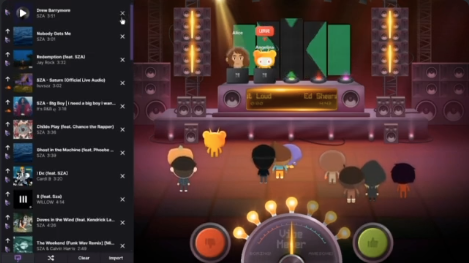
Discord Lofi is a built-in Activity that allows you to listen to synchronized Lo-fi Hip Hop music with friends directly in a Voice Channel.
If you are looking for the perfect background noise for studying, coding, or just relaxing, this is it. By utilizing the “Activity” feature, Discord creates a virtual study room where everyone hears the same relaxing beats at the same time, boosting productivity and reducing isolation.
🎧 What is Discord Lofi?
“Lofi” (Low Fidelity) Hip Hop is a genre of music characterized by a slow tempo (low BPM), mellow beats, and nostalgic environmental sounds (like rain or vinyl crackles).
According to productivity experts, this type of music is ideal for “Deep Work” because:
- It reduces distractions: The lack of lyrics prevents your brain from focusing on words.
- It lowers anxiety: The repetitive, soft rhythms induce a state of relaxation.
- Social Accountability: When listening with friends on Discord, it creates a “Body Doubling” effect, where the presence of others helps you stay on task.
🚀 How to Start Listening (Step-by-Step)
You don’t need a music bot or YouTube links. You can launch this directly from the app.
- Join a Voice Channel: Enter any voice channel in your server.
- Click the Rocket Icon: Locate the “Start an Activity” button (🚀) in the voice control panel.
- Select “Lofi”: Scroll through the list and look for the Lofi (often “Lofi Girl” or similar) activity.
- Start Listening: The music will begin playing instantly.
- Invite Friends: Click “Invite” to let others in the channel sync up with your stream.
Note: Everyone in the channel needs to click “Join Activity” to hear the music. It does not automatically play over the voice chat like a bot.
✅ Benefits of Lofi on Discord
Why use this instead of Spotify or YouTube?
- Synchronized Experience: Everyone hears the same beat at the same moment. It creates a shared sense of “we are in this together.”
- No Installation: Unlike music bots, you don’t need to invite a bot to the server or type complex commands.
- Resource Light: It runs within Discord, saving your computer’s memory compared to keeping a Chrome tab open.
❓ FAQ: Common Questions
Q: Can I choose specific songs?
A: Generally, no. The Lofi activity functions like a radio station. It plays a continuous, curated stream of tracks designed for focus. You cannot skip or request specific songs.
Q: How do I adjust the volume?
A: You can adjust the volume inside the Activity window itself. This only changes the volume for you, not for your friends, so everyone can set their preferred level.
Q: Is it free?
A: Yes. The core Lofi activity is free to use for all Discord users.
Q: Can I use this on Mobile?
A: Yes. Join the voice channel on your phone, tap the Rocket icon, and select the activity. It works great for studying on the go.
Q: Why isn’t the activity launching?
A: If it fails to load, try these quick fixes:
- Check your internet connection.
- Update your Discord app to the latest version.
- Turn on “Hardware Acceleration” in your User Settings > Advanced.
🌟 Conclusion
The Discord Lofi Activity is more than just a music player; it is a productivity tool. Whether you are cramming for finals or grinding through a work project, turning your Voice Channel into a “Lofi Lounge” can make the process less stressful and more social.
To recap:
- Click the Rocket to start.
- Sync up with friends for a study session.
- Relax with lyric-free beats.
Next Step for You: Why not schedule a “Study Night” with your server? Create an event for tonight and try the Lofi activity together!