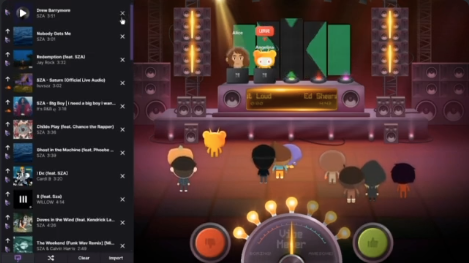
Hangout FM is a social music activity on Discord that allows you to listen to music with friends, take turns DJing, and interact via custom avatars directly within a Voice Channel.
If you want to turn a standard voice chat into a virtual music festival, Hangout FM is the perfect tool. Unlike simple music bots, this activity provides a visual, interactive platform where you can share tracks from Spotify, Apple Music, YouTube, and SoundCloud while reacting in real-time.
🎧 What is Hangout FM?
Hangout FM is a music sharing platform integrated into Discord Activities. It allows users to gather in a virtual room, represented by avatars, and listen to music simultaneously.
Key Features:
- Multi-Platform Support: Plays music from Spotify, Apple Music, YouTube, and SoundCloud.
- Social Listening: Everyone hears the same track at the same time (syncing may vary based on your music subscription).
- Visual Experience: Unlike audio-only bots, you get a visual interface with avatars, a stage, and chat.
🚀 How to Start Hangout FM (Step-by-Step)
You can launch a listening party in seconds without installing any external software.
1. Join a Voice Channel
Enter any voice channel on your server.
2. Launch Activities
Click the Rocket Ship Icon 🚀 (labeled “Start an Activity”) located in the voice control panel.
3. Select Hangout FM
Scroll through the list of available activities and select “Hangout FM”.
4. Connect Your Music
To participate fully, you will be prompted to link your music account (e.g., log in to Spotify or YouTube) to sync the audio.
🎛️ Top Features & Why You Should Use It
Hangout FM is designed for community interaction, making it different from simply sharing a link.
🎤 The DJ Experience
Friends can take turns being the DJ. You can curate a playlist, and when it’s your turn, your avatar takes the spotlight on the virtual stage to play your selection for the room.
💃 Avatars & Reactions
You can customize a unique avatar within Hangout FM. While the music plays, you can use emotes, dance, and chat live with other listeners, creating a deeper sense of immersion than a standard text chat.
🎵 Music Discovery
By listening to what your friends queue up, you can discover new genres and artists naturally. It’s a great way to broaden your musical horizons.
❓ FAQ: Hangout FM
Here are the most common questions regarding this music activity.
Q: Is Hangout FM free?
A: Yes. The core features are free to use. However, some advanced features or cosmetic items may require a paid plan in the future.
Q: Which music services are supported?
A: It currently supports Spotify, Apple Music, YouTube, and SoundCloud.
Note: For the best experience with Spotify/Apple Music, having a Premium account is often recommended to ensure uninterrupted playback.
Q: Can I use it on Mobile?
A: Yes. You can join the activity, listen, and chat directly from the Discord mobile app.
Q: Can I customize my avatar?
A: Yes. You can change your avatar’s appearance directly inside the Hangout FM interface to match your style.
🌟 Conclusion
Hangout FM creates a shared space where music lovers can connect. Whether you are hosting a study session, a party, or just chilling, it adds a visual and interactive layer to listening to music.
To recap:
- Click the Rocket to start.
- Link your accounts for the best experience.
- DJ with friends to share your favorite tracks.
Next Step for You: Open Discord, jump into a Voice Channel, and launch Hangout FM to see who has the best music taste in your server!