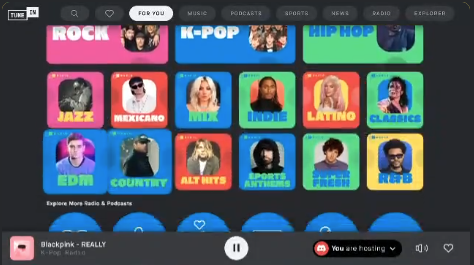
“TuneIn Radio & Podcasts” is a Discord Activity that allows you to stream over 100,000 global radio stations, live news, and podcasts directly in a Voice Channel with friends.
Unlike music bots that require complex commands, TuneIn is a native feature that lets you explore audio from around the world—from local FM stations to international news—completely legally and for free. This guide covers how to use it, its best features, and common questions.
📻 What is TuneIn Radio on Discord?
TuneIn is a popular audio streaming service integrated into Discord’s “Activities” system. It focuses on live broadcasts rather than on-demand songs.
- Live Radio: Listen to real FM/AM stations from Tokyo, New York, London, and more.
- Podcasts: Stream episodes of popular podcasts together.
- Genres: Covers Music, Sports, News, and Talk Radio.
- Social Listening: Everyone in the channel hears the broadcast in sync (latency may vary slightly).
🚀 How to Start Listening (Step-by-Step)
You can turn your server into a radio lounge in seconds.
1. Join a Voice Channel
Hop into any voice channel in your Discord server.
2. Open Activities
Click the Rocket Ship Icon 🚀 (labeled “Start an Activity”) located in the voice control panel (bottom left on Desktop).
3. Select TuneIn
Scroll through the menu and select “TuneIn Radio & Podcasts”.
4. Authorize & Play
Click “Authorize” to launch. You can now browse stations by genre, location, or language and start playing immediately.
🎧 Key Features
The Discord version of TuneIn is optimized for community listening.
🌍 Search & Explore
You aren’t limited to local stations. You can use the Search Bar or World Map feature to find:
- Lo-fi beats for studying.
- J-Pop or K-Pop stations.
- Live sports commentary.
- Breaking news (CNN, BBC, etc.).
❤️ Favorites (Library)
Found a station you love? Click the Heart Icon to save it to your library. This makes it easy to jump back into your favorite morning show or music mix the next time you hang out.
🔊 Local Volume Control
Is the radio too loud while you are trying to talk? You can adjust the volume of the activity specifically for yourself using the slider inside the activity window, without lowering the volume of your friends’ voices.
❓ FAQ: TuneIn on Discord
Here are the answers to the most common questions about this activity.
Q: Is TuneIn free to use?
A: Yes. The TuneIn Activity on Discord is free. It is ad-supported, so you may hear occasional commercials depending on the station you choose.
Q: Can I play specific songs (like Spotify)?
A: No. TuneIn is a Radio service. You select a station (e.g., “Top 40 Hits”), and it plays whatever that station is broadcasting. You cannot request specific tracks on demand.
Q: Can I use it on Mobile?
A: Yes. Join the voice channel on your phone, tap the Rocket icon, and launch TuneIn.
Q: Is it legal?
A: Yes. Unlike third-party music bots that often get shut down, TuneIn is an official Discord partner, making it a stable and legal way to listen to music.
Q: Why can’t I hear the audio?
A: Ensure you have clicked “Join Activity” if you entered the channel after the music started. Also, check your Discord User Settings > Voice & Video > Output Device.
🌟 Conclusion
Discord’s TuneIn Radio & Podcasts activity is the perfect alternative to music bots when you want a “set it and forget it” background vibe. Whether you want to listen to energetic sports radio or chill jazz from Paris, you can share the experience instantly with your community.
To recap:
- Official & Free: No bots required.
- Global Access: Listen to radio from anywhere.
- Easy Setup: Just click the Rocket icon.
Next Step for You: Open Discord right now, launch TuneIn, and search for “Lo-fi” or “Jazz” to set a relaxing mood for your server!