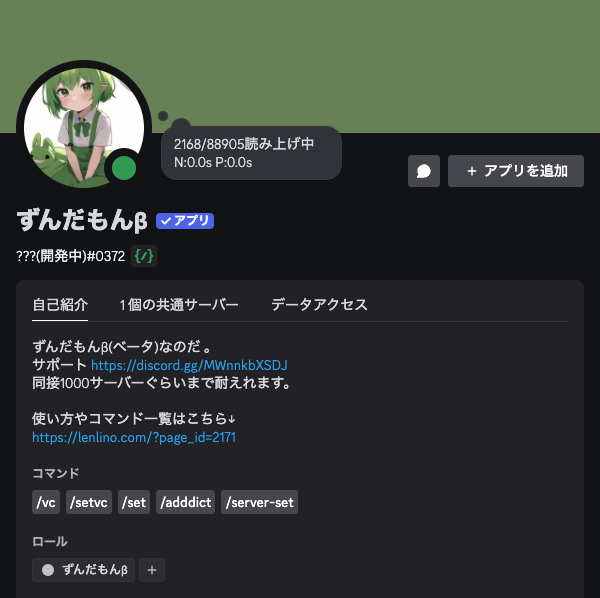
Introduction: Why Choose Zundamon β?
“Zundamon β” is a powerful text-to-speech (TTS) bot that reads your Discord chat messages aloud. It makes communication smoother and more engaging by turning your text channels into a live conversation.
It’s perfect for when you’re in the middle of a game or busy with a task and can’t look at the screen. You’ll never miss out on the conversation.
Key Features at a Glance
- Chat Reading: Automatically reads messages from your text channel.
- Vast Voice Library: Supports VOICEVOX, COEIROINK, and SHAREVOX.
- Per-User Voices: Easily tell who’s talking with unique voice settings for each user.
- Customization: Adjust the speed and pitch to your liking.
- Dictionary Function: Register or change the pronunciation of specific words.
- Premium Plans: Unlock even more powerful features (details below).
Zundamon β Feature Deep-Dive
1. Enjoy a Huge Variety of Voices (VOICEVOX, COEIROINK, SHAREVOX)
One of Zundamon β’s best features is its massive voice library. It supports the following synthesis engines (partial list):
| VOICEVOX | COEIROINK | SHAREVOX |
| Shikoku Metan | Tsukuyomi-chan | Koharune Ami |
| Zundamon | MANA | Tsukuyomi-chan |
| Kasukabe Tsumugi | KANA | Byakuchi- |
| Amehare Hau | O-futon-P | Y-kun |
| Namine Ritsu (and more) | (and more) | (and more) |
(Note: Many more voices are available. Check the bot’s help command or support server for the latest list.)
2. Command List & How to Use (It’s Easy!)
Zundamon β is easily controlled with slash commands. Here are the main commands you need to know.
/vc: Starts or stops reading in a voice channel./setvc: Changes your voice. You will be prompted to enter the voice ID./set: Changes your personal settings.voice: Changes your voice type.pitch: Adjusts reading pitch (recommends -10 to 10, default 0).speed: Adjusts reading speed (default 100).
/adddict: Adds a word to the dictionary.surface: The word’s spelling.pronunciation: How to pronounce it.audio_file: [Premium] Plays an audio file instead (wav, 10MB max).dict_file: Imports a dictionary (JSON).- Example:
/adddict surface:discord pronunciation:Dis-cord
/deletedict: Deletes a word from the dictionary.- Example:
/deletedict surface:discord
- Example:
/showdict: Shows your list of registered dictionary words. Can also export as JSON./server-set: [Admin Only] Configures server settings.autojoin: Automatically joins a VC (run in the target text channel).readname: Reads the user’s name (1=ON, 0=OFF).reademoji: Reads emojis (1=ON, 0=OFF).readjoinleave: Reads join/leave notifications (1=ON, 0=OFF).readurl: Reads the title of URLs (Premium, 1=ON, 0=OFF).lang: Reading language (ja/ko).eew: Emergency Earthquake Warnings (ON/OFF).translate: Auto-translation (ON/OFF, Premium).
/setalarm: Sets an alarm. (Example:/setalarm action:add time:1520 loop:1010100)- Global Dictionary Commands:
/addglobaldict,/deleteglobaldict(Must be used in the support server).
Evolve with the Community! The Zundamon β Global Dictionary
The Zundamon β Global Dictionary is a shared dictionary that works across all servers the bot is in.
By registering a word’s pronunciation, it will be read correctly on every server. This helps standardize the reading of common words, creating a more natural and comfortable experience for everyone.
Of course, you can still use the server-specific dictionary for your server’s unique needs.
Upgrade Your Experience! Zundamon β Premium Plans
Zundamon β offers premium plans for users who want even more features. By subscribing, you get an increased character limit, access to COEIROINK voices, and many other convenient functions.
| Feature | Free Plan | Premium (100 JPY) | Premium (300 JPY) | Premium (500 JPY) | Premium (1000 JPY) |
| Character Limit | 50 | 100 | 100 | 100 | 100 |
| Temp Voice Change | × | ○ | ○ | ○ | ○ |
| COEIROINK Access | × | ○ | ○ | ○ | ○ |
| Priority Reading | × | ○ | ○ | ○ | ○ |
| Earthquake Alerts | × | ○ | ○ | ○ | ○ |
| Voice Dictionary | × | ○ | ○ | ○ | ○ |
| Alarm Function | × | ○ | ○ | ○ | ○ |
| Zundamon α (Dev) | × | ○ | ○ | ○ | ○ |
| Auto-Translate | × | ○ | ○ | ○ | ○ |
| GPU-Accelerated Audio | × | × | × | ○ | ○ |
| VOICEVOX API | × | × | × | × | ○ |
| Available Bot Count | 1 | 2 | 3 | 4 | 5 |
With a premium plan, you can also share your benefits with up to 3 servers using the /set premium_guild (number) command.
How to Sign Up:
For details on subscribing to a premium plan, please check the Zundamon β support server.
Common Troubleshooting & Solutions
- Bot isn’t responding?
- Check if the bot is online.
- Make sure the bot is in the correct channel.
- Check for typos in your command.
- Check the bot’s permissions on the server/channel.
- Audio is choppy or laggy?
- It may be lagging during peak hours. Try again later.
- Switch to a more lightweight voice (e.g., Zundamon Normal).
- Consider the premium plan for priority reading.
- Settings aren’t applying?
- Wait a few moments for it to take effect.
- Double-check your command parameters.
- Try restarting the bot (
/vcto stop, then start again). - Contact the support server.
- Global Dictionary isn’t updating?
- It may take some time to reflect. Please wait.
- Check the spelling and reading of the word.
- Check the registration status in the support server.
Other Handy Features to Know
- Server Settings (
/server-set):autojointo start reading automatically,readname/reademoji/readjoinleaveto customize what’s read,langto change language, and more. - Alarm Function (
/setalarm): Automatically sends a message at a set time. Great for regular announcements. - Translation (
Premium): Smooths communication in multilingual communities. - Emergency Earthquake Warnings: A support tool for disaster information (can be toggled ON/OFF).
Frequently Asked Questions (FAQ)
Q: How much does it cost? What can I get on the free plan?
A: Zundamon β’s basic reading functions are available on the free plan. There is a 50-character limit, but it’s very useful. We also offer premium plans for more advanced features.
Q: Does it support languages other than Japanese?
A: Currently, the supported reading languages are Japanese and Korean. The premium auto-translate feature can help support multilingual communication.
Q: What makes Zundamon β different from other TTS bots?
A: Its strengths are the wide variety of voices (VOICEVOX, COEIROINK, SHAREVOX), the Global Dictionary that unifies pronunciation across communities, and its ease of use. It offers plenty of features on the free plan, with more advanced options available via premium.
Q: Is it secure? What about privacy?
A: Zundamon β operates securely through the Discord API. It does not have any functions that collect personal information. Please use it with confidence. It also adheres to the terms of service for all supported voice synthesis engines.
Q: How do I cancel my premium plan?
A: For information on how to cancel your premium plan, please contact us in the support server.
Q: The bot feels slow or laggy. How do I fix it?
A: During peak hours, audio generation may take longer. Try switching to a more lightweight voice with the /setvc command or wait a moment and try again. The premium “Priority Reading” feature is also an effective solution.
QData: What kind of support is available? Where can I ask questions?
A: Please feel free to ask any questions or make requests in our official Discord support server’s #ticket channel.