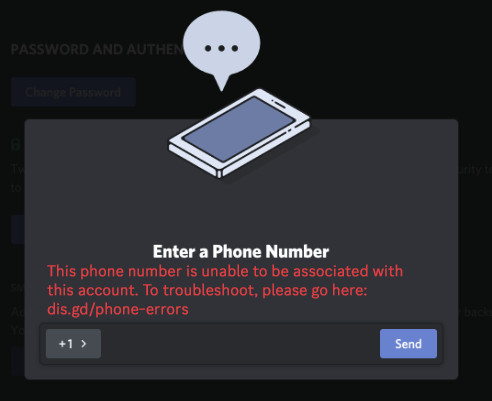
“Invalid Phone Number.”
“This number is already associated with another account.”
You are trying to join a server or verify your account, but Discord is blocking your phone number. It is one of the most frustrating roadblocks on the platform.
The short answer: Discord has strict anti-spam rules. They reject VOIP numbers (like Google Voice) and Landlines. If you get an “Already Registered” error, it usually means you have an old “ghost account” attached to that number that you need to log into and delete.
Here is a step-by-step guide to troubleshooting every major phone verification error.
🚫 Error 1: “Invalid Phone Number”
If you see this message immediately after typing your number, it means Discord’s system rejects the type of number you are using.
Common Causes:
- VOIP / Burner Apps: Discord blocks almost all “Virtual” numbers (Google Voice, TextNow, Skype). You must use a legitimate mobile carrier (AT&T, Verizon, T-Mobile, etc.).
- Prepaid/Landlines: Some prepaid plans and all landlines are blocked.
- Wrong Format: Ensure you have the correct Country Code selected (e.g., +1 for USA, +81 for Japan) and that there are no extra spaces or dashes.
The Fix: You must use a standard mobile number with a valid SIM card plan. There is no workaround for VOIP numbers.
⚠️ Error 2: “Phone Number Already Registered”
This is the most common error. It means your number is currently attached to a different Discord account—likely an old alt account you forgot about.
Since one number = one account, you must remove it from the old account first.
How to Fix It (The “Login” Trick)
Do not try to add the number to your current account yet. Instead, follow these steps to free up your number:
- Open an Incognito/Private browser window.
- Go to the Discord Login page.
- Log in using your PHONE NUMBER (not email).
- If you don’t know the password for that old account, click “Forgot Password?”
- Discord will SMS you a code. Use it to reset the password and log in.
- Once inside the old account, go to User Settings > My Account.
- Click Remove Phone Number.
Once removed, you can log back into your main account and add the number successfully.
⏳ Error 3: “You are being rate limited”
Did you click “Resend Code” too many times?
The Problem: Discord has a security cooldown. If you try to verify a number too many times in a short window, they block you to prevent spam.
The Fix:
- Wait 24 Hours: This is a hard lock. Trying again in 5 minutes will only reset the timer. You must wait a full day before trying again.
❓ Frequently Asked Questions (FAQ)
Q: Can I bypass phone verification?
A: Usually, no.
If a specific server requires “Highest” verification settings, you cannot join without a phone number. If Discord flagged your account for suspicious activity, you must verify to unlock it.
Q: Is it safe to give Discord my number?
A: Yes.
Discord uses your number for Two-Factor Authentication (2FA) and anti-abuse measures. They do not sell your number or display it publicly on your profile.
Q: Can I use a friend’s phone number?
A: Not recommended.
If your friend ever decides to join Discord and uses their number, it will kick the number off your account, potentially locking you out again. Always use a number you control.
🌟 Summary
- Invalid? You are likely using a VOIP/Burner number. Switch to a real carrier.
- Registered? Log in with the phone number to find the old account and remove it.
- Rate Limited? Stop clicking and wait 24 hours.
Next Step: If you are getting the “Already Registered” error, open an Incognito Window right now and try logging in with your phone number to find that ghost account!