Introduction
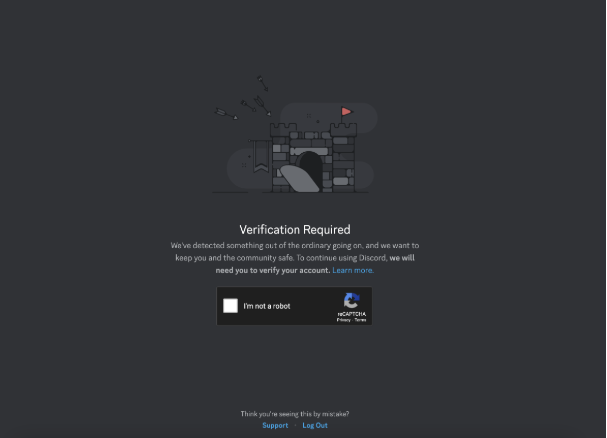
Seeing the “Verification Required” message on Discord? This means Discord’s anti-spam system has flagged your account for unusual activity. The fix is to verify your account by providing a valid mobile phone number and entering a code sent via SMS. This guide explains why it happens and how to solve every common error.
Why Am I Seeing This Message?
Discord’s security system triggers this prompt to protect the platform (and its users) from spam, bots, and abuse. This is not the same as Two-Factor Authentication (2FA); it’s a one-time security check.
Common triggers include:
- Joining many servers in a short period.
- Sending Direct Messages (DMs) to many users who are not your friends.
- Suspiciously fast automated messaging or posting (bot-like activity).
- Using a shared, public, or suspicious IP address (like some VPNs).
- Trying to join a server that has a “phone verification” requirement for all new members.
How to Verify Your Account (Step-by-Step)
- Start the Process: When you see the prompt, click “Verify.”
- Solve the Captcha: You will likely need to solve a Captcha (like “click all the tractors”) to prove you are human.
- Enter Your Phone Number: Select your country and enter your mobile phone number.
- Important: This must be a number not currently linked to another Discord account.
- Enter the Verification Code: Discord will send you a 6-digit code via SMS. Enter this code into the prompt.
- Complete: Once the code is accepted, your account will be verified and unlocked.
How to Fix Common Verification Errors
This is where most users get stuck. Here are the most common errors and their solutions.
1. Error: “Invalid Phone Number”
This is the most frequent issue. It means Discord’s system will not accept your number.
- The Cause: You are using a VoIP (Voice over IP), burner, or landline number. Discord requires a real, active mobile number from a standard carrier (like AT&T, Verizon, T-Mobile, etc.) to prevent spam.
- How to Fix:
- You must use a different, valid mobile phone number.
- Pro-Tip: If your valid mobile number fails on the desktop app, try the verification process on your smartphone’s Discord app (using mobile data, not Wi-Fi). This often works.
2. Error: “Rate Limited / Recently Used Phone Number”
- The Cause: You have either tried to verify too many times, or the phone number was recently used on another Discord account.
- How to Fix:
- Wait. This is a temporary timeout. Stop trying and wait at least 24-48 hours before attempting again.
- Advanced Tip: This error can be IP-based. Try resetting your internet router to get a new IP address, or switch from Wi-Fi to your phone’s mobile data.
3. Error: “Existing Account”
- The Cause: The phone number you’re using is already attached to a different Discord account (perhaps an old one you forgot about).
- How to Fix:
- You must log in to the other account that is using the number.
- Go to User Settings > My Account on that old account and click “Remove” next to the phone number. (It may ask you to add a different number to replace it).
- If you cannot access the old account, you must contact Discord Support directly.
Frequently Asked Questions (FAQ)
Q: Can I verify without a phone number? A: No. For this specific “Verification Required” security prompt, a valid mobile number is mandatory. Using online SMS-receiving services or burner apps is against Discord’s Terms of Service and can get your account permanently banned.
Q: I didn’t receive the SMS code. What do I do? A: First, double-check that the number is correct. If it is, click “Resend Code” and wait at least 10 minutes. Also, check your phone’s “Spam” or “Unknown Senders” text message folder. If it still doesn’t arrive, try restarting your phone or contact Discord Support.
Q: Can I delete my phone number after I verify? A: This is very difficult. Unlike other services, Discord considers the phone number a part of your account’s security. You cannot simply remove the number and leave it blank. You can only replace it with a different, valid phone number from the User Settings > My Account page.
Conclusion
While Discord’s “Verification Required” message can be frustrating, it’s a crucial defense against spam and bots. The most important step is to use a valid mobile number, not a VoIP or burner service. If you run into errors like “Invalid Phone Number,” try switching to your mobile app, and if you’re “Rate Limited,” just wait 24 hours before trying again.