Introduction
Discord’s Membership Screening is a crucial safety feature that requires new members to explicitly read and agree to your server’s rules before they are allowed to talk, react, or send Direct Messages (DMs) in your server. This is the single most effective way to ensure every new user has seen your guidelines.
What is Membership Screening?
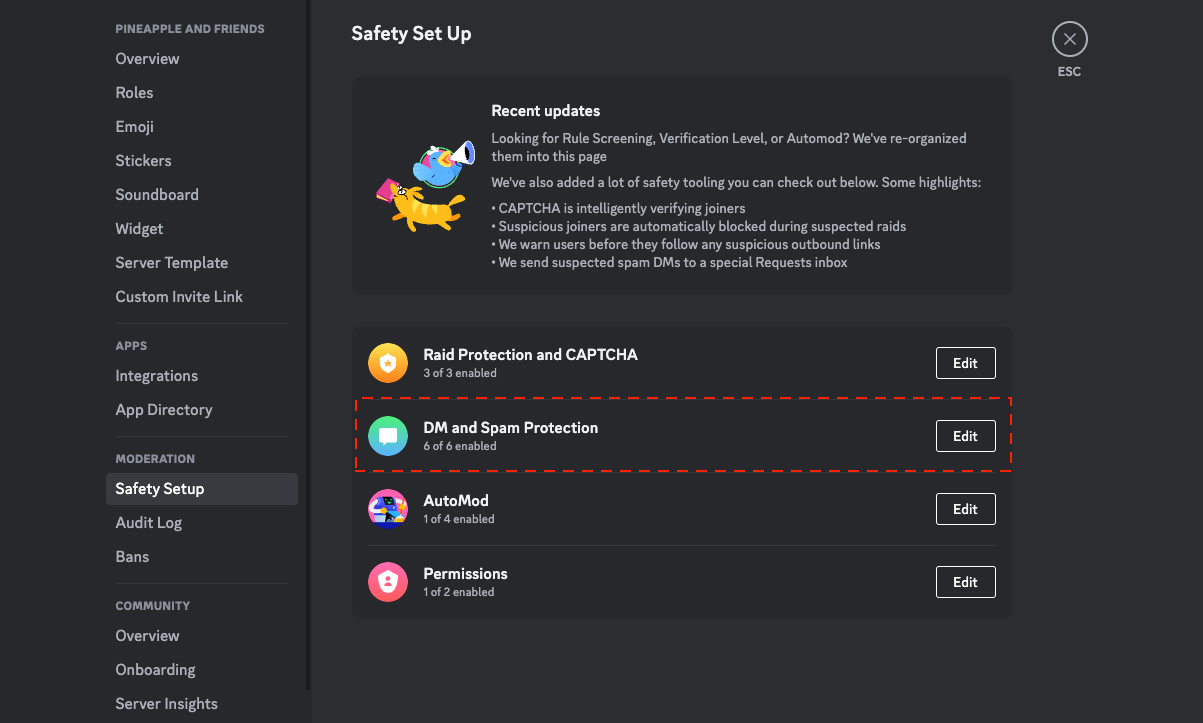
This feature, found in your “Safety Setup,” acts as a gateway for your server. When enabled, new members will be presented with a full-screen pop-up that lists your server’s rules.
They cannot participate in the server until they check a box and click “Submit.”
Enabling this feature helps you:
- Reduce Spam & Raids: It stops bots and spammers who join servers and instantly post malicious links.
- Improve Community Quality: It forces every user to acknowledge your rules, reducing “I didn’t know” excuses.
- Proactively Prevent Problems: It sets a clear, respectful tone for your community from the moment a user joins.
Once a new member joins, they are restricted from:
- Sending messages
- Adding reactions
- Sending DMs to other server members
- Joining voice channels
How to Set Up Membership Screening (Step-by-Step)
You must have a “Community Server” enabled to access this feature. (You can enable this in Server Settings > Enable Community).
- Open Server Settings: Right-click your server’s icon and select “Server Settings.”
- Go to Safety Setup: On the left-hand menu, under the “Moderation” category, click “Safety Setup.”
- Find Membership Screening: Scroll down and find the “Membership Screening” section. Click the “Edit” button.
- Enable the Feature: Toggle on the setting labeled “Members must accept rules before they can talk or DM.”
- Set Up Your Rules: Click the “Get Started” button. This is where you will write the rules you want new members to see. You can add pre-made example rules (like “Be respectful”) or write your own custom rules (up to 16).
- Save Your Changes: Once you’ve added your rules, click “Save.”
Frequently Asked Questions (FAQ)
Q: Which servers benefit most from this feature? A: While all communities can benefit, it’s most effective for public or large servers with a high volume of new members. It’s also essential for servers that enforce strict rules for discussion (e.g., support servers, 18+ communities, or serious topic servers).
Q: What’s the difference between “Rule Screening” and “Membership Screening”? A: This is a common point of confusion.
- Membership Screening: This is the name of the official feature in your Server Settings that you enable.
- Rule Screening: This is the action that the Membership Screening feature performs (i.e., it screens new members by showing them the rules).
Q: Will this extra step make people leave my server? A: It’s possible some users may be deterred by the extra click. However, the consensus among community managers is that the trade-off is worth it.
“The small number of users you might lose are often the exact type of low-engagement users or rule-breakers you were trying to filter out in the first place. The members who stay are of higher quality.” — Discord Moderator Insights (2024)
Q: What other security measures can I use? A: For maximum security, combine Membership Screening with:
- AutoMod: Automatically block spam and harmful words.
- Verification Level: Set this to “Medium” or “High” in
Safety Setupto require users to have a verified email or be a member for a set time. - 2FA Requirement: Force all of your moderators and admins to use Two-Factor Authentication.
Conclusion
Discord’s Membership Screening is a simple but powerful tool for protecting your community. By setting it up, you proactively filter out spammers and ensure every new member understands your community’s expectations, leading to a safer and more positive environment for everyone.